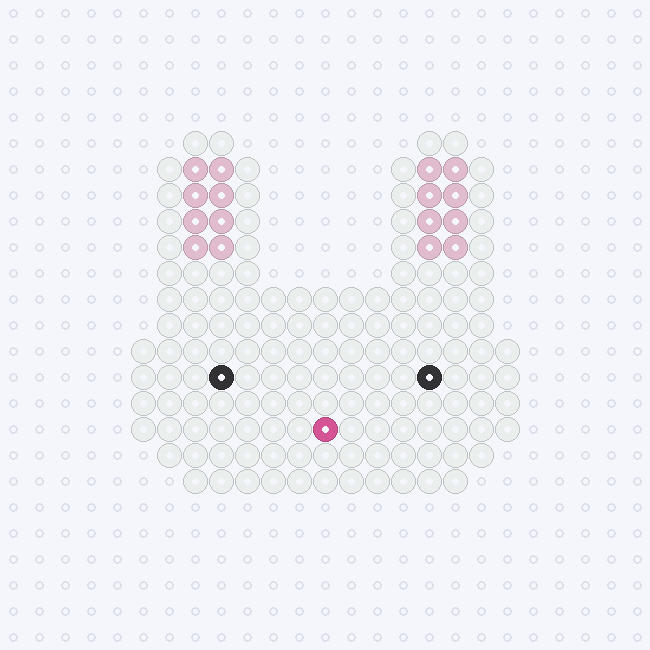
Tall ears carry the whole bunny. This design is a White face and two tall ears with Light Pink inside, two Black eyes and a single Pink nose — mostly one color, so it is quick to bead. Because it is white, build it on a darker pegboard or a contrasting backing if you want the outline to stand out.
Start your own design in the maker →
Perler colors & exact bead counts
This page shows the full chart and exact color counts — 154 beads on a 17×14 grid. Read the chart beside your pegboard. Colors are matched to the real Perler color list in our community palette dataset.
| Color | Perler name | Code | Beads |
|---|---|---|---|
| White | 80-19001 | 135 | |
| Light Pink | 80-19079 | 16 | |
| Black | 80-19018 | 2 | |
| Pink | 80-19083 | 1 | |
| Total | 154 |
What you need for this bead pattern
- 154 midi (5 mm) fuse beads in the 4 colors listed above. Perler beads are sold as midi beads.
- A square pegboard of at least 17×14 pegs; a large square board has 29×29 pegs.
- Ironing paper and a household iron. An adult should do the fusing.
How to build the bunny face bead pattern
- Use a square pegboard with space for 17×14 beads and place the colors above by counting the grid. Leave empty cells empty; the decorative margin is not part of the design.
- Check the color changes and empty spaces against the full chart before fusing.
- Fuse with ironing paper and an iron, as in our step-by-step Perler ironing guide, and let it cool flat under a book.
Print or save this bead chart
This page is a reading chart: keep it open beside your pegboard, or use your browser’s print function. The chart image is not printed at bead size, so count the grid rather than laying beads on paper. To keep a copy, open the full chart image and save or print it from there. To change colors, size or add a name, open the maker, where a new design can be exported as a PDF (A4 or Letter), PNG, CSV or JSON.
Want something different? Start your own design from a photo or a word in the maker.