

BeadDraft matches every cell of your photo to the closest of 103 Perler-compatible reference colors, and “closest” is measured in Oklab, a color space built so that equal numeric distances look like roughly equal differences to the eye — not by comparing raw red, green and blue numbers. It then keeps the most-used beads up to your Max colors limit and matches every cell again against that smaller set. The colors are on-screen references, so check the shades against the beads you own before you buy.
The four steps, in the order they run
- Convert each cell to Oklab. Your browser first draws the photo down to the grid size, so the matcher sees one color per bead. Cells that are mostly transparent (alpha under 128) are skipped, and so is the plain-background area if you turned on background removal.
- Find the nearest allowed bead. Each color is compared with every allowed palette color — all 103 unless you untick some under Allowed generation colors — using the squared straight-line distance in Oklab. The smallest wins; if two beads tie exactly, the one listed earlier in the palette keeps the match.
- Count and cut to Max colors. The matcher counts how many cells landed on each bead and keeps the most-used ones, up to the Max colors slider (2–12).
- Re-match against the kept set. Every cell is matched again, this time only against the kept beads. When the kept set has four or more colors, the darkest shade that appeared in step 2 is always kept, even if it was rare, so a pupil or outline survives.
There is no dithering and no neighbor smoothing: each bead’s color depends only on the photo cell underneath it. That is why the photo you start with matters so much.
Why not compare RGB numbers?
Because RGB distance and visible difference are not the same thing. Oklab (published by Björn Ottosson in 2020) was designed so that distance in the space tracks perceived difference more evenly. The matcher converts each color from sRGB to linear light (R, G and B below are the linear values), then to Oklab with these coefficients, and compares squared distances (the square root would not change which bead is nearest):
l = cbrt(0.4122214708 R + 0.5363325363 G + 0.0514459929 B)m = cbrt(0.2119034982 R + 0.6806995451 G + 0.1073969566 B)s = cbrt(0.0883024619 R + 0.2817188376 G + 0.6299787005 B)L = 0.2104542553 l + 0.793617785 m − 0.0040720468 s, anda,bfrom the matching rows of the published matrix.
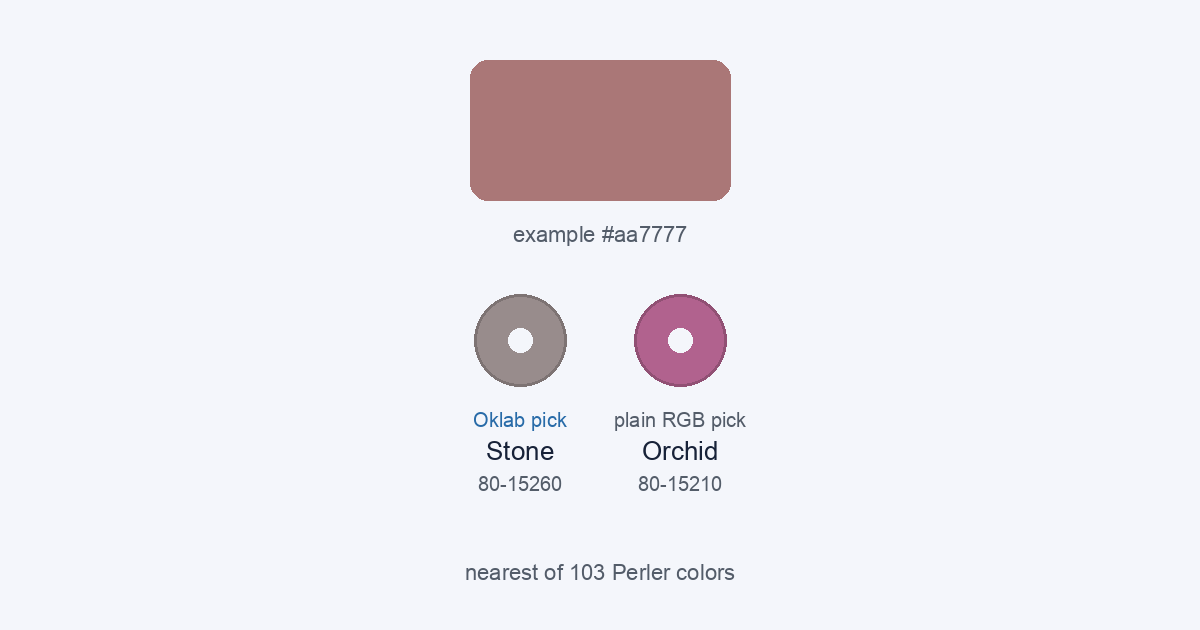
The two methods really do choose different beads. Here are three example colors I picked by hand (not sampled from a photo), matched both ways against the real palette:
| Example color | Oklab pick (what BeadDraft uses) | Plain RGB pick |
|---|---|---|
| #aa7777 | Stone 80-15260 Oklab distance 0.058 · RGB distance 34.7 | Orchid 80-15210 Oklab distance 0.073 · RGB distance 31.9 |
| #77bbdd | Sky 80-15216 Oklab distance 0.039 · RGB distance 45.6 | Blueberry Creme 80-19093 Oklab distance 0.056 · RGB distance 24.4 |
| #ddaa99 | Tan 80-19035 Oklab distance 0.041 · RGB distance 25.7 | Sand 80-19098 Oklab distance 0.053 · RGB distance 22.1 |
Each method wins on its own ruler, which is the point: the question is which ruler follows what your eye sees. To see how often it matters, I ran a 16 × 16 × 16 grid of test colors (every 17th value from 0 to 255 in each channel, 4,096 colors) through both methods on 15 October 2026. They chose different beads for 1,669 of the 4,096 (40.7%). Many corners of that grid are saturated colors no bead can match, so I repeated it for only the 1,706 test colors that land within an Oklab distance of 0.05 of some bead: they still disagree on 521 (30.5%). As a check, an independent re-implementation of the formula agreed with the real matcher’s output on all 4,096 colors.
What it matches against
The default palette is the 103 standard-line Perler entries from the MIT-licensed community dataset maxcleme/beadcolors: a reference code, a name and a hex value for each. It does not include Perler Mini or Caps colors. The hex values are what the matcher measures, so the match is only as good as those screen references. The names and codes identify compatible colors; BeadDraft is not affiliated with or endorsed by Perler or Hama, and this is not an official brand catalog. You can browse every entry on the Perler color chart, including a search by hex value.
What Max colors changes
Cutting the palette means some cells are matched to a bead that is farther away than their true nearest, because that nearest bead did not make the cut. That is the trade you accept for a shorter shopping list. Two things soften it: the cut keeps the most-used beads, so the big areas stay accurate, and the darkest-shade rule protects small dark details when you have four or more colors. If you want to reduce colors after the grid exists, that is a different tool with a different rule; the reduce-colors guide explains Simplify.
Checking the result against your beads
- Open the materials list and read the codes, not just the names. The codes are what you compare with your bags.
- Hold a few real beads next to the on-screen chart. Screen hex values do not carry material finish, and fusing can change how beads look.
- If you do not own a shade, untick it under Allowed generation colors and generate again, so every cell is matched among the beads you have.
- Start from a clear, well-lit photo; the matcher cannot recover color that the photo does not contain.
To see the match on your own picture, open the pattern maker, upload an image and compare the preview with the materials list.
What this page does not prove
I did not compare any match against physical beads, and I did not run a viewer study of Oklab against RGB results. The numbers above come from the palette data and the matcher’s own formula, on test colors I chose. They tell you how the tool decides, not how a finished piece will look on your pegboard.