

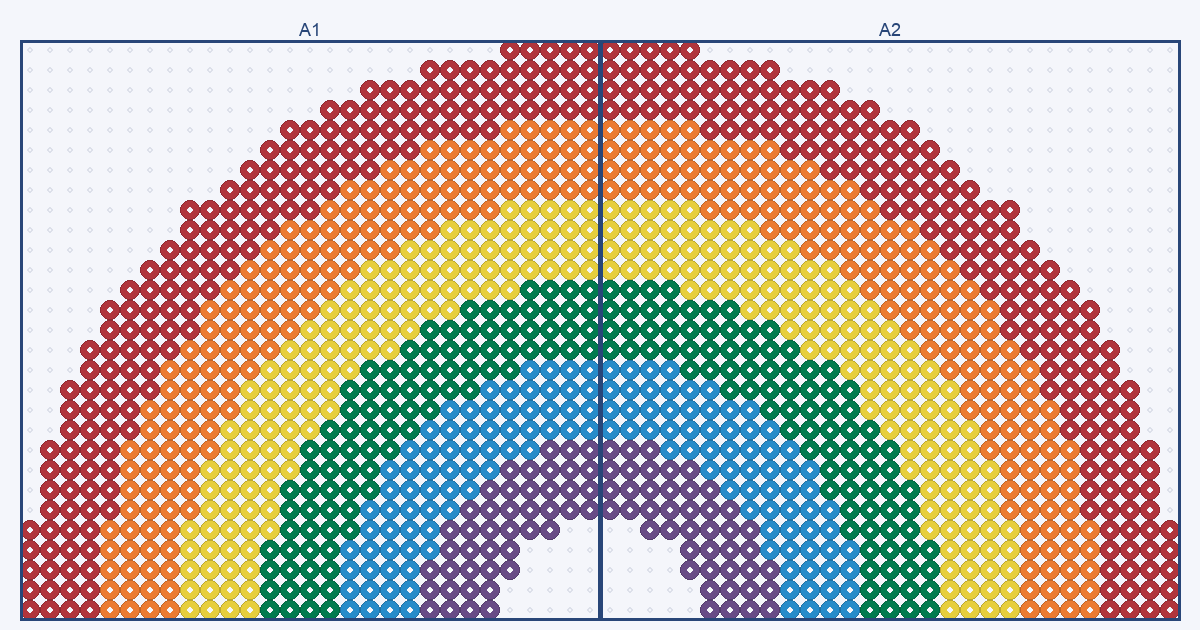
A large Perler bead pattern is any design wider or taller than one 29×29 pegboard, and the number of boards is ceil(width ÷ 29) × ceil(height ÷ 29). A 58×29 rainbow arch is 2 boards side by side and 1,282 beads; the biggest grid the maker accepts, 120×120, is 25 boards and 14,400 cells.
A big rainbow across two boards
This original design is a half-circle arch of six bands, each four beads thick, drawn from a half circle of radius 29 cells. It is 58 beads wide and 29 tall, so it fills exactly two boards, named A1 and A2 as in the maker's PDF. The seam falls between column 29 and column 30, and because the arch is mirror-symmetric each board holds 641 beads. At the nominal 5 mm per bead it is about 290×145 mm before ironing.
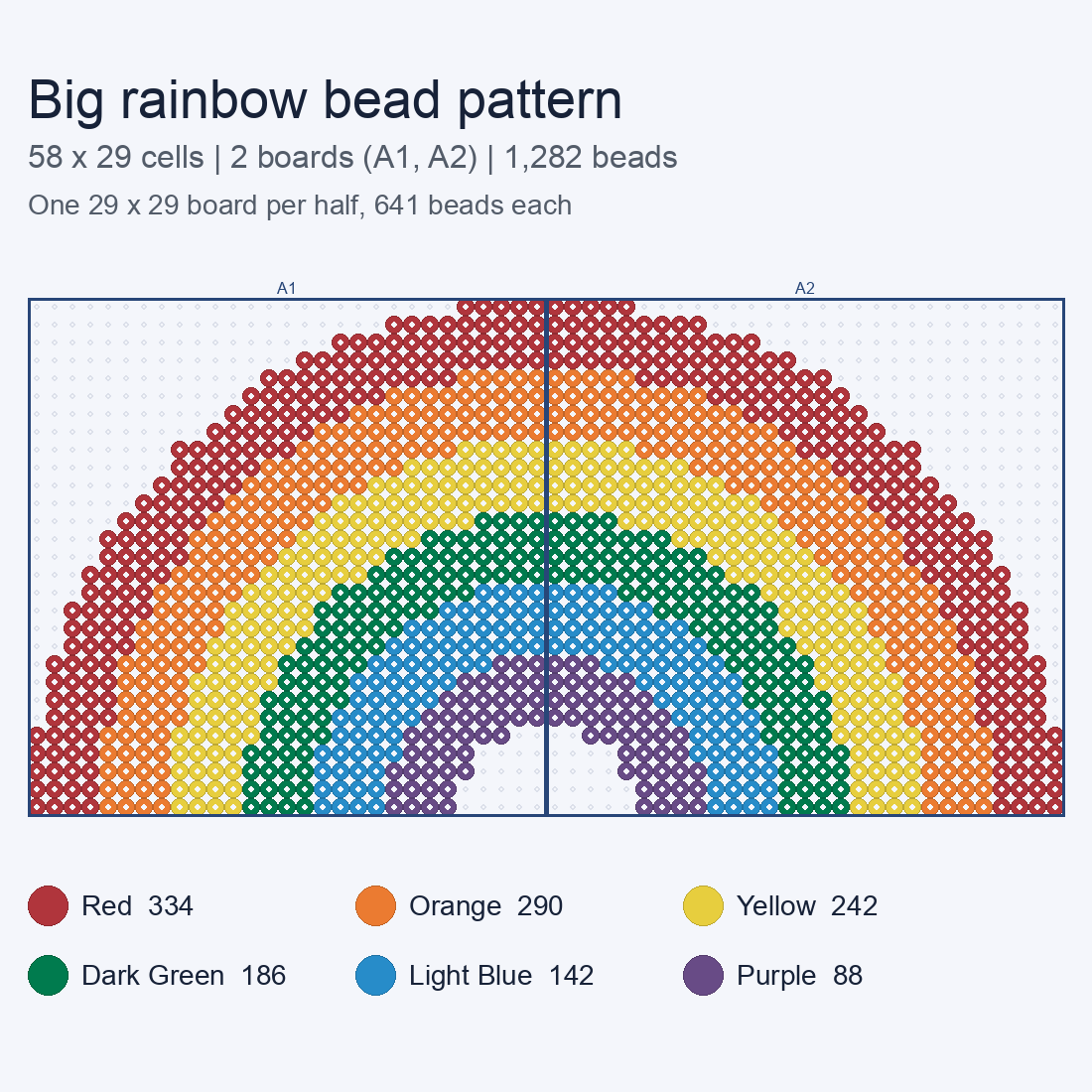
| Band | Perler name | Code | Beads |
|---|---|---|---|
| 1 | Red | 80-19005 | 334 |
| 2 | Orange | 80-19004 | 290 |
| 3 | Yellow | 80-19003 | 242 |
| 4 | Dark Green | 80-19010 | 186 |
| 5 | Light Blue | 80-19009 | 142 |
| 6 | Purple | 80-19007 | 88 |
| Total | 1,282 |
Bands are numbered from the outside in (Red outermost, Purple innermost). The full chart with a per-color list is on the big rainbow page; for the small version see the 23×13 rainbow.
How many boards a big design needs
The maker's PDF divides a chart into 29×29 sections, one per board, so the board count is the width and height each divided by 29 and rounded up, then multiplied. Bead counts below are the full rectangle, so a design with empty cells uses fewer. Sizes use about 5 mm per standard (midi) bead, from the Wikipedia article on fuse beads; real pieces vary with the beads and ironing.
| Grid | Boards | Across × down | Cells | Nominal size (mm) |
|---|---|---|---|---|
| 29×29 | 1 | 1 × 1 | 841 | 145×145 |
| 58×29 | 2 | 2 × 1 | 1,682 | 290×145 |
| 58×58 | 4 | 2 × 2 | 3,364 | 290×290 |
| 87×58 | 6 | 3 × 2 | 5,046 | 435×290 |
| 87×87 | 9 | 3 × 3 | 7,569 | 435×435 |
| 116×116 | 16 | 4 × 4 | 13,456 | 580×580 |
| 120×120 | 25 | 5 × 5 | 14,400 | 600×600 |
The maker's width presets are 29, 58 and 87 cells and its slider runs from 12 to 120. The height follows your crop and also stops at 120.
Widths that cost an extra board
Because boards are 29 wide, one cell past a multiple of 29 adds a whole column of boards. A grid 58 wide needs 2 boards across, but 59 wide needs 3, and the third holds a single column. If your design allows it, trim to a multiple of 29.
| Width | Boards across | Columns on the last board |
|---|---|---|
| 58 | 2 | 29 of 29 |
| 59 | 3 | 1 of 29 |
| 87 | 3 | 29 of 29 |
| 88 | 4 | 1 of 29 |
| 116 | 4 | 29 of 29 |
| 117 | 5 | 1 of 29 |
| 120 | 5 | 4 of 29 |
For example, a square 120×120 grid is 25 boards, but 116×116 is 16, and the extra 9 boards would carry only the last 4 columns and rows.
The PDF, board by board
Export from the maker and the PDF starts with a materials page: grid size, total beads, number of colors and number of boards, then the list of colors with codes and counts. After that there is one page per board. Each page is titled with the board name, such as Board A1 (1/2), and the column and row range it covers, such as Columns 1–29, rows 1–29. Rows are lettered A, B, C… and columns are numbered, so A2 is the first row, second board across. Every fifth cell is numbered along the edges, and the footer says to read left to right, top to bottom.
The PDF is a READING CHART — NOT 1:1: it is meant to sit beside your pegboard, not underneath it, and the maker has no calibrated bead size or bead type setting. Build one board at a time from its own page, then lay the finished boards out in the order of their names.
Seams and joining
- Design with the seam in mind. Beads fuse only to the beads they touch, so beads on either side of a board seam are not fused to each other when each board is ironed on its own. The rainbow's seam runs through all six bands.
- Decide how the pieces join before ironing. People commonly fuse each board and then join the pieces on a backing, but we have not tested joining methods, so try one on scrap beads first.
- Iron each board the same way. The Wikipedia article describes laying the pegboard flat, covering it with parchment paper and passing a dry iron over it, and notes that the result depends on how long the beads are ironed. Keep the passes equal so neighbouring boards come out the same size.
- Sort colors first. A big design has a long color list, so lay out the beads for each color before you start. The totals above are for the whole design; use the board pages for per-board work.
Make your own big pattern
- Open the maker. Pick a photo or type a short text, then set the grid width with a preset (29, 58 or 87) or the slider (12 to 120).
- Check the board count. Candidate cards show actual bead and board counts, so you see how many boards a choice needs before you apply it.
- Cap the colors. Generation allows up to 12 colors; fewer colors are easier to sort across several boards.
- Apply, then inspect and edit. Paint or erase cells and the counts update. Nothing is applied until you confirm.
- Export the confirmed chart. Download the PDF reading chart, a PNG or a CSV. Unapplied previews are not exported.
A photo may be cropped to your chosen width, and a photo that is too tall for a 120-cell height is rejected until you pick a smaller width or crop it. Detail is the reason to go big: see the pixel art grid maker page for how width changes what survives.