

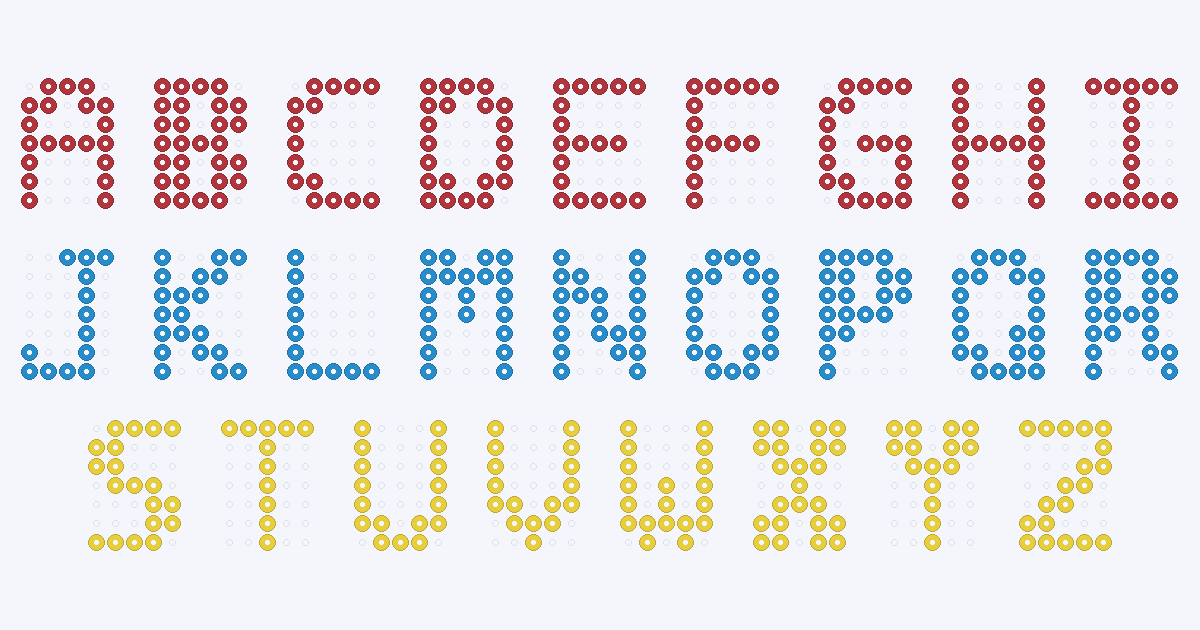
There are two ways to make a name in Perler beads. Type it into the maker's text mode and edit the result, or build it from the original A–Z chart below, where every letter is 5 beads wide, 7 tall and one connected piece. A name of n letters is 6n − 1 beads wide, so a three-letter name such as MIA is 17 beads wide and about 85 mm across at the nominal bead size.
A–Z bead letter chart
Each letter is drawn on its own 5×7 grid. A filled circle is a bead and an empty space is an empty peg. The charts are original BeadDraft drawings in one color, so use any Perler color you like: the count under each letter is the number of beads of that color. Every bead touches a neighbour along a side, not only at a corner, so each letter fuses as one piece.
The letters range from 11 beads (L and T) to 28 beads (B); the whole alphabet is 480 beads. For colors and codes, see the Perler color chart; screen shades are approximations, so compare them with the beads you own.
How big is a name?
Each letter is 5 beads wide and letters are separated by a one-peg gap, so the width is 6n − 1 for n letters and the height is 7 beads. A standard (midi) fuse bead is about 5 mm across, according to the Wikipedia article on fuse beads, so multiply by 5 for a nominal size before ironing. The real piece varies with your beads and how long you iron, so measure a test row first. The table adds one bar row under the word, explained in the next section.
| Name | Grid | Letter beads | Bar beads | Total | Nominal size (mm) |
|---|---|---|---|---|---|
| MIA | 17×8 | 56 | 17 | 73 | 85×40 |
| LEO | 17×8 | 49 | 17 | 66 | 85×40 |
| EMMA | 23×8 | 80 | 23 | 103 | 115×40 |
| NOAH | 23×8 | 78 | 23 | 101 | 115×40 |
| SOPHIA | 35×8 | 111 | 35 | 146 | 175×40 |
A row that is 29 beads wide, the width of the maker's default grid preset, holds at most 5 letters with these gaps. Longer names need a wider grid (the maker accepts 12–120 cells across) or a second line.
Two examples drawn from the same chart, with the bar row under each:
Banner tiles or one piece
- Separate tiles. Build each letter on its own, fuse it, and string the tiles on cord, as on the bead letter banner page. Every letter is one connected piece, so each tile fuses as it is.
- One piece with a bar. The one-peg gaps leave the letters unattached, so the chart adds a full bar of beads along the bottom. Every letter's bottom row has at least one bead, so the bar joins them all; the bar is the 17 extra beads counted in the table.
For either choice, the method the Wikipedia article describes for fusing is to lay the pegboard flat, cover it with parchment paper and move a dry iron over it. It also notes that, depending on how long the beads are ironed, their holes may or may not close up, so if you want to thread a banner, keep the passes short and test the hole before you commit.
Type any name in the maker
The maker has a Text tab next to Photo. It takes a name or short message of up to 24 characters, draws it in a bold sans-serif font scaled to fit the grid width you choose, and matches the result to the 103-shade Perler palette.
- Open the maker and pick Text. Type the name. The field suggests keeping words short.
- Set the grid width. It accepts 12–120 cells across and the height follows the width. A wider grid gives thicker, smoother letters.
- Cap the colors. Generation allows up to 12 colors. One or two keep a name easy to read.
- Apply, then inspect and edit. Thin strokes can break into single beads at small widths, so check every letter, paint or erase cells, and recount after any edit.
- Export the confirmed chart. Download a PDF reading chart, PNG or CSV. Unapplied previews are not exported.
Text mode draws its letters from a font, so its shapes are not the 5×7 letters on this page. Use the chart above when you want a fixed, known bead count per letter, and the maker when you want a different look or a longer message. The PDF is a READING CHART — NOT 1:1, so place it beside the board, not underneath. There is no bead type or diameter switch.
Making letters hold together
- Check that every bead touches a neighbour on a side. Beads that meet only at a corner may not fuse, which is why the charts above avoid diagonal-only contacts.
- Use strong contrast. A dark letter on a light tile, or the reverse, reads from further away than two similar shades.
- Count before you buy. Add the letter counts in the table, plus the bar if you want one piece, and compare with the code list for your color.
- Keep names short for a first project. Three or four letters is 73–103 beads with a bar.
- Words from your own picture. To combine a name with a drawing, start from the small patterns or keychain patterns and edit cells by hand.