

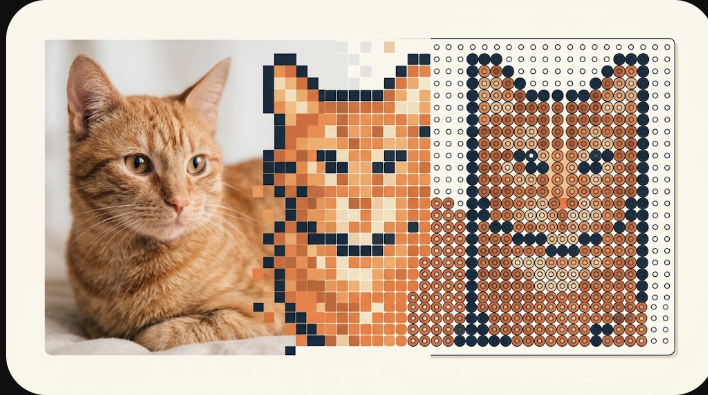
Bead art is a picture built from a grid of colored beads. The most common kind you can make from a photo is fuse-bead art — beads (sold as Perler, Hama or Artkal) laid one per peg on a pegboard and fused with heat. The quickest route from a picture to something you can build is the pattern maker: it snaps every cell to a real bead color, counts how many of each you need, and prints a grid. It runs in your browser and is free.
What bead art is
“Bead art” covers several crafts — seed-bead weaving, loom work, pony-bead figures — but the form that starts from a photo is fuse-bead (melty-bead) art. Because each bead sits on a fixed grid, a fuse-bead piece is really low-resolution pixel art you can hold: every square of the picture becomes one bead of the nearest available color. That grid structure is exactly why a photo converts into a buildable bead chart so cleanly.
Bead art from a photo
You do not need to plot it on graph paper. Use the pattern maker in three steps:
- Upload a photo (or type a short word) and set the grid width in beads.
- The tool maps every cell to the nearest real bead shade and limits the palette to the number of colors you choose, so the result is actually buildable.
- Read the exact count of each color, then print or export the chart (PNG, CSV, PDF or JSON).
A clear subject and good contrast convert best — see how to prepare a photo before you upload. Because the design is made from your own picture, you are not copying anyone else’s chart.
Bead art patterns
If you want a starting point instead of your own photo, browse bead designs made from photos or easy fuse bead patterns for quick builds. Each opens in the maker so you can change the size, swap colors, and print your own version rather than a fixed printout.
Choosing size and colors
Two settings decide how a piece turns out: the grid size (how many beads wide) and how many colors you allow. Fewer, larger cells are easier to build; more cells hold more detail but need more beads. If a photo looks noisy, reducing the color count usually makes it read better as beads.
What this tool does and does not make
This maker builds fuse-bead art from images: it matches to a single Perler-based palette of 103 shades and produces a square-grid chart. It does not generate seed-bead loom, brick-stitch or peyote patterns, and it is not affiliated with Perler or Hama — the color names are used only to identify compatible beads. What you get is an editable grid and an exact color count you can build from any compatible midi beads you already own.