

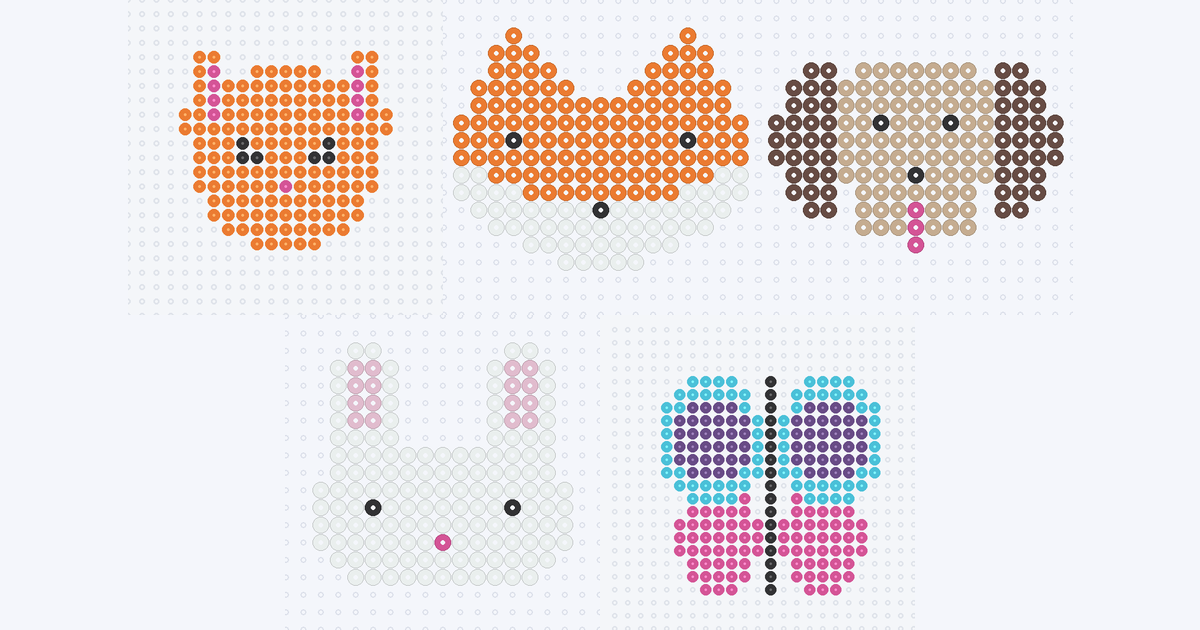
Animal faces are some of the most satisfying small bead projects: a few bold shapes — ears, eyes, a nose — and the animal is instantly recognizable. Below are five free, original animal charts with real Perler colors and exact bead counts, and a way to make your own from a photo of your pet in the pattern maker. Free, in your browser.
Animal patterns to try
Each chart is an original BeadDraft design of a generic animal, with the exact color count computed from the bead grid. Open one for the full chart and printable PDF:
- Cat face — orange head with pointed ears and a pink nose; 157 beads, 3 colors.
- Fox face — orange with white cheeks and a black nose; 170 beads, 3 colors.
- Dog face — tan face, brown floppy ears and a pink tongue; 139 beads, 4 colors.
- Bunny face — tall white ears with pale-pink insides; 154 beads, 4 colors.
- Butterfly — a symmetrical four-color design; 231 beads, the largest of the set.
The full pattern gallery has every theme, and the simple patterns page has even smaller starter shapes.
What makes an animal read well in beads
- Ears do most of the work. Pointed ears say cat or fox, floppy ones say dog, tall ones say bunny. Get the ears right and the rest can stay simple.
- Two dots and a nose are enough. A face with two single-bead eyes and one nose bead looks friendlier and cleaner than one with lots of tiny detail, which turns to noise at bead scale.
- Keep the palette small. Three or four colors per animal keeps the chart easy to follow; a second shade only earns its place where it shows a real feature, such as the pale inside of a bunny ear.
- Use symmetry. Every face here is mirror-symmetric, so you read half the chart and repeat it.
Make your own pet pattern
- Pick a tight crop. A close, well-lit photo of the face against a plain background works best; busy backgrounds and fur texture blur at bead scale.
- Choose a small grid. A width around 29 beads (the default preset) keeps the face bold; go wider only if you want more detail and don't mind more beads.
- Cap the palette low. Four to six colors lets the maker merge close shades into clean Perler colors instead of a speckled mix.
- Tidy and print. Clean the outline and eyes with the paint tool, then export the PDF reading chart and CSV color counts.
Expect a stylized bead version of your pet rather than a portrait — fine fur detail does not survive a bead grid, but markings and ear shape usually do. The step-by-step guide to turning a photo into a bead pattern walks through a full example.
Colors and settings
Every chart uses real Perler shades — for example Orange (80-19004) for the fox and cat, Tan (80-19035) and Brown (80-19012) for the dog, and White (80-19001) with Light Pink (80-19079) for the bunny. The Perler color chart lists all 103 colors in the maker so you can swap a shade for one you already own. A white animal such as the bunny disappears on a white pegboard, so back it with a darker board or a contrasting mat when you iron it.